Spotify Lossless Is Bit-Perfect. So Why Are Most Premium Users Still Not Hearing It?
Spotify spent four years promising a lossless tier and eight years fielding rumours about one before it actually arrived, last September — long after rivals like Tidal, Qobuz, and Apple Music had already made the jump (see our comparison, I Tried 5 Music Streaming Services So You Don’t Have To). When it finally landed, it did something unusual for a major streaming platform: it delivered exactly what it said it would. FLAC, up to 24-bit/44.1kHz, folded into the standard Premium subscription at no extra cost. No separate HiFi tier to upsell, no asterisk about “select markets forever.” Just switch it on.
That’s the part tripping people up. Switch it on.
Because the overwhelming majority of the roughly 276 million people paying for Spotify Premium worldwide have, by every indication, never actually done that. Not because they don’t care about sound quality, and not because the feature is hidden behind a paywall or a waitlist. It’s because Spotify built Lossless to be off by default, and then built the process of turning it on to be more fiddly than almost anyone assumes.
The setting that doesn’t follow you
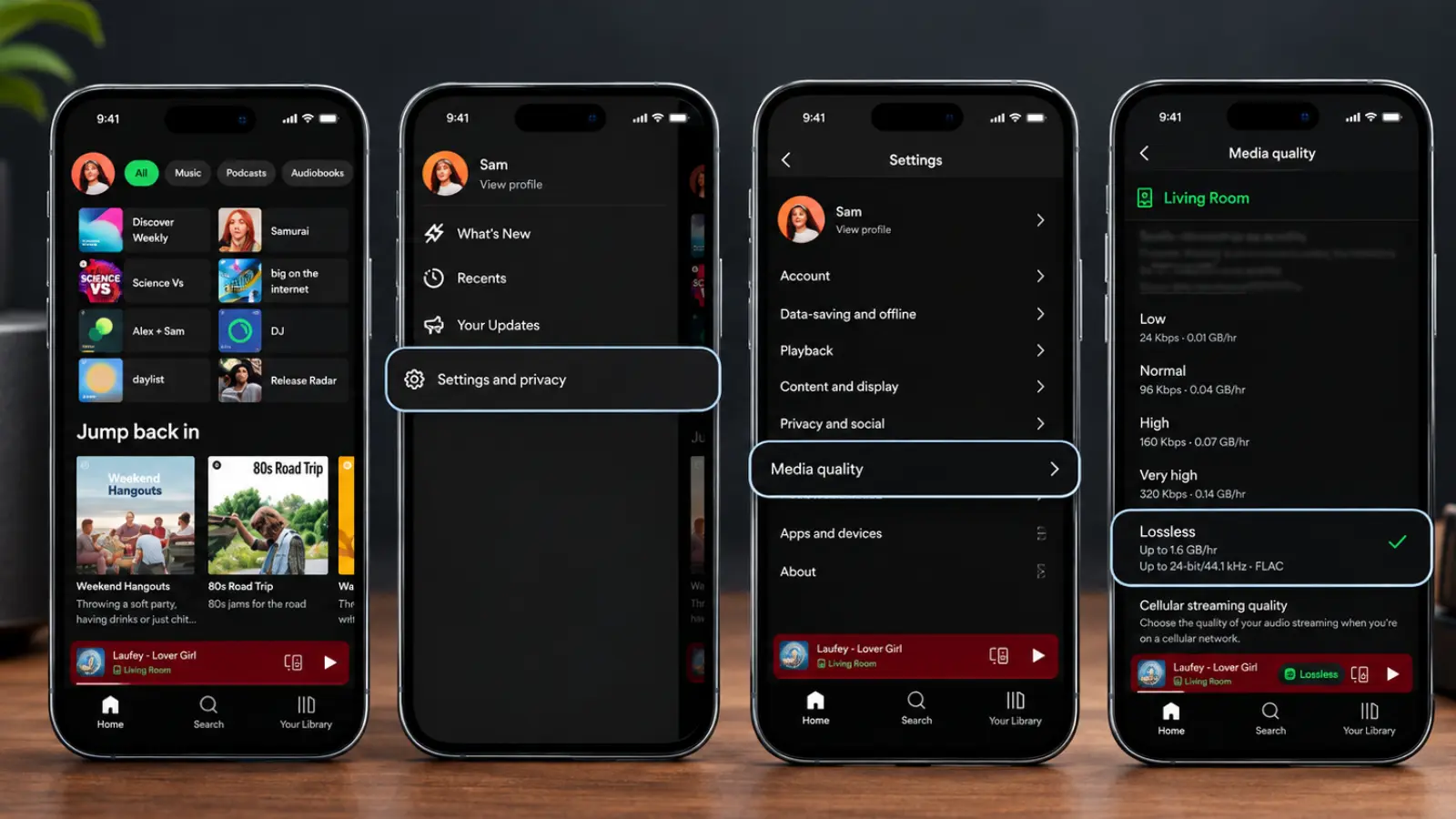
Enable Lossless on your phone, and you might reasonably think you’re done. You’re not. The setting lives independently on every device you use Spotify with — your phone, your laptop, your tablet; each one needs its own trip into Settings & Privacy, then Media Quality, then a manual toggle to Lossless for streaming, downloads, or both.
That alone accounts for a lot of the silence. Most people set it up once, on whichever device they happened to be holding when the update landed, and assumed the rest would follow. It doesn’t.
But the more interesting failure sits one layer deeper, and it caught out someone who really should have known better.
When What Hi-Fi? put Spotify Lossless through a proper lab test earlier this year — recording the streamed output and subtracting it, sample by sample, against CD rips of the same masters — the results were about as good as this kind of test gets, seven tracks, close to 150 million individual samples, zero discrepancies. Bit-perfect, no caveats. It’s a genuinely rare thing for a streaming service to earn that verdict outright.
What happened next is the part worth paying attention to. The reviewer running the test, Stephen Dawson, had already gone through his phone, iPad, and Windows PC and switched each to Lossless the moment the feature landed in Australia. Job done, he assumed. Then he streamed a track to a WiiM network streamer for the actual test — and the recording came back identical to the old 320kbps stream. Not lossless. He tried a second device, a Lyngdorf streaming amplifier. Same result: 320kbps, reported plainly on the unit’s own display.
The setting on his phone and computer had done nothing at all for either speaker. It turns out that with Spotify Connect — the protocol used to send audio to networked speakers, streamers, and amps rather than play it through the device in your hand — the quality setting has to be applied while connected to that specific piece of hardware. Your phone and laptop share one setting between them, so getting either one right covers both. But every Connect target you own is its own separate toggle, invisible until you’re actively streaming to it.
I Tried 5 Music Streaming Services So You Don’t Have To
If a hi-fi journalist running a dedicated lossless test can lose a full evening of listening to a setting he was certain he’d already switched on, it’s not much of a stretch to assume most Premium subscribers, going about a normal Tuesday, have never gotten it right on their main system at all.
Even if you flip every switch, most gear can’t carry it anyway
There’s a second, larger reason the numbers on paper don’t translate into people actually hearing a difference: Bluetooth.
Lossless audio, by definition, can’t be compressed on the way to your ears without ceasing to be lossless. Bluetooth, even with the better codecs like aptX HD or LDAC, still compresses the signal to fit it through the connection’s limited bandwidth. Spotify is upfront about this — wireless earbuds and Bluetooth headphones simply aren’t part of the lossless picture, full stop. You need a wired connection, a USB DAC, or a Wi-Fi-based link like Spotify Connect to actually receive the unbroken stream.
Roughly seven in ten headphone users are on Bluetooth. Layer that on top of the people who never got the per-device setting right in the first place, and the pool of Premium subscribers actually hearing lossless audio on a given evening starts to look very small indeed — even before you factor in desktop listeners on a Mac, where Spotify’s Exclusive Mode (needed to stop the operating system quietly resampling the stream) only shipped for Windows in early 2026 and, as of writing, still hasn’t arrived at all.
It’s worth saying plainly: none of this is Spotify cheating anyone. The audio itself checks out. The company just built a feature that rewards people who already think carefully about their signal chain, and is functionally invisible to everyone else — which, going by conversations What Hi-Fi? has had with engineers at Sennheiser, Bowers & Wilkins, and Technics this year, may be closer to company philosophy than accident. All three told the magazine that mainstream headphone buyers consistently prioritise comfort, battery life, and ease of use over chasing higher bitrates — which is a fairly blunt way of saying the industry doesn’t think most people will notice, or go looking for, what Spotify just switched on.
How to actually check
If you want to know whether you’re one of the people actually hearing it, the fix takes about two minutes, done properly.
- Open Settings & Privacy, then Media Quality, on every device you regularly use — phone, tablet, laptop, desktop — and set each to Lossless.
- If you use Spotify Connect to a speaker, streamer, or amp, don’t stop there. Start playback to that device specifically, then check its quality setting again while connected. It’s stored separately per speaker.
- Watch for the small “Lossless” badge in the Now Playing view or the Connect picker while something is actually playing. That badge, not the toggle in settings, is your real confirmation.
- If you’re on Bluetooth headphones or earbuds, none of the above will change what reaches your ears. You’ll need a wired connection, Spotify Connect over Wi-Fi, or a USB DAC to hear any of it.
- Lossless eats considerably more data than even the old Very High setting — expect somewhere in the region of 600MB to 1GB an hour — so it’s worth leaving cellular on a lower quality setting and saving Lossless for Wi-Fi or downloads.
It’s a genuinely good feature, arriving free inside a subscription tens of millions of people already pay for. It’s just one that Spotify has made remarkably easy to switch on for the wrong device, or the wrong output, and never notice the difference.